

InvoCue
Log in

Create and send invoices
without leaving WhatsApp.

InvoCue is an invoice generator that lives inside WhatsApp. Text or voice-note the client, the job and the price, and you get back a professional PDF invoice with your logo — ready to forward to your client from the same chat. No app to install, no forms, no laptop.

  • First invoice free
  • No credit card
  • Set up in 30 seconds

InvoCue

online

Example

Invoice for Maria Lopez: kitchen faucet replacement 180, parts 45, due in 7 days

📋 Invoice INV-0012 · Maria Lopez

Kitchen faucet replacement
$180.00
Parts
$45.00
💵 Total
$225.00
Yes

INV-0012.pdf

1 page · PDF

Reply YES and the PDF lands in the chat, ready to forward.

Why invoice on WhatsApp?

It’s the app you already use

No new logins or passwords. Your invoices live in the same place you already talk to your clients.

Done from the job site

Send the invoice while you’re still at the client’s door — not at 10 p.m. at the kitchen table.

Forward it in one tap

The PDF arrives in your chat. Forward it to your client on WhatsApp, or send it by text or email.

Edit by replying

Wrong price? Reply “change the faucet to 200”. No menus, no forms, no starting over.

Your first invoice in 3 steps

No app to download. No training. If you can send a WhatsApp, you can use InvoCue.

  1. 1

    Say it

    Send a voice note or a text with the client, the job and the price — in English or Spanish.

  2. 2

    Check it

    InvoCue shows you a draft with items, tax and total. Reply YES — or just say what to change.

  3. 3

    Send it & get paid

    Get a professional PDF with your logo and send it to your client, with a link to pay by card.

First invoice free · No credit card

How to send a professional invoice through WhatsApp

A photo of a handwritten note or a text with an amount works — until a client asks for a proper invoice. A professional WhatsApp invoice should have:

  1. 1

    A PDF, not a screenshot

    A PDF keeps your layout, can be printed or saved, and looks like a real business document.

  2. 2

    Your business details

    Business name, logo, phone and email, so your client knows exactly who they’re paying.

  3. 3

    An invoice number and date

    A unique number (like INV-0012) and the issue date make payments easy to track and taxes easier to file.

  4. 4

    Each service with its price

    Itemized lines — labor, materials, extras — prevent back-and-forth questions and late payments.

  5. 5

    Tax and a clear total

    Add sales tax (or GST/HST in Canada) when it applies, and put the total where nobody can miss it.

  6. 6

    Payment terms and a way to pay

    A due date, the payment methods you accept and, ideally, a pay-by-card link.

InvoCue builds all of this automatically from a single message.

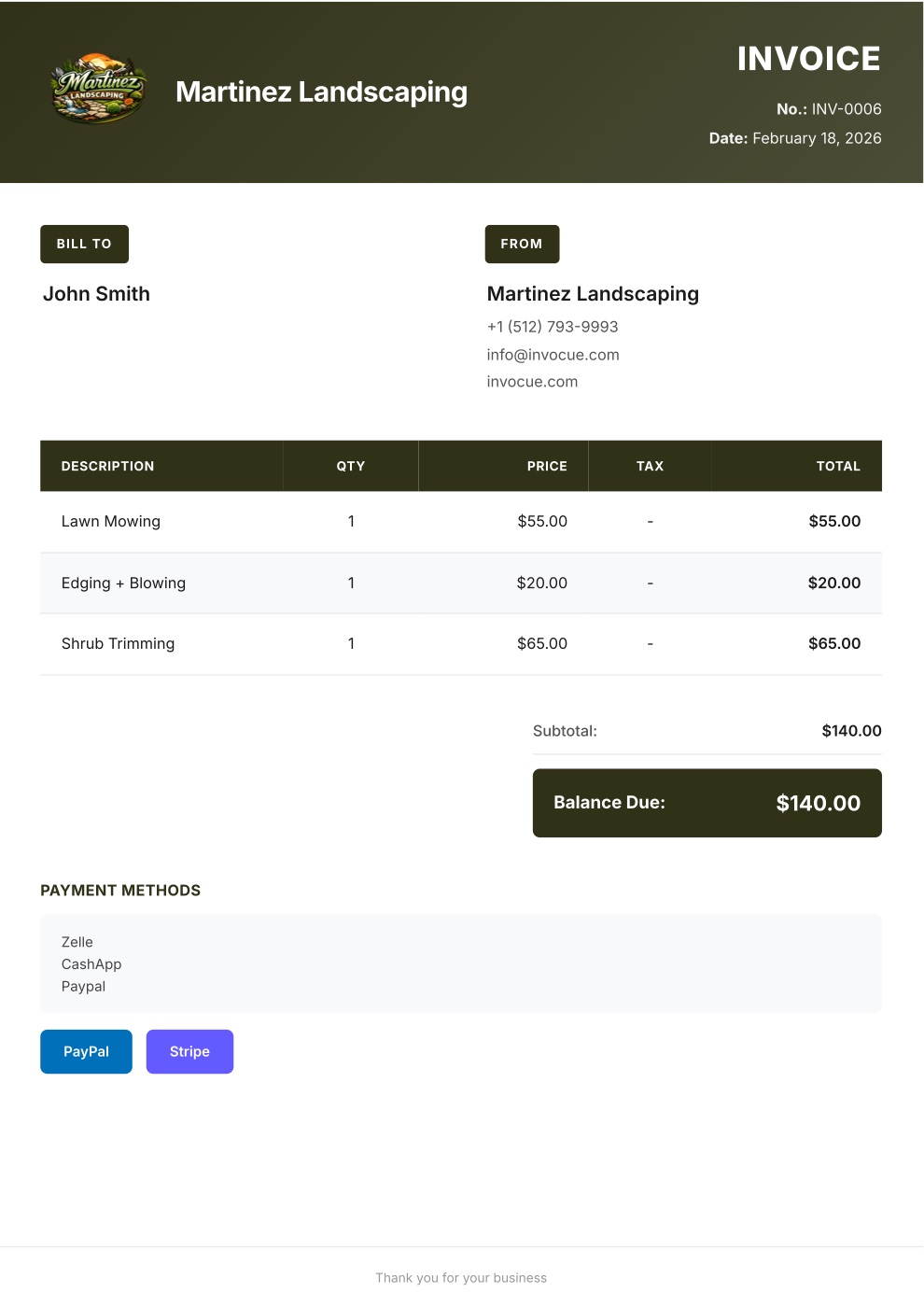
Example invoice PDF created with InvoCue
✓

Payment received

$140.00 · paid by card

The result

What your client receives

A clean, professional PDF with your logo and colors — the kind of invoice that gets paid on time.

  • Your brand on every document

    Logo, colors, contact info and signature.

  • Math done for you

    Items, quantities, tax, discounts and totals — calculated automatically.

  • Pay-by-card buttonPro

    Secure Stripe payment link so clients can pay in a couple of taps.

  • Every document you need

    Invoices, estimates, quotes and receipts — in English or Spanish.

Pricing

Simple pricing. Try it free.

Every plan starts with a 3-day free trial. $0 today, cancel anytime.

Starter

For getting started

$29/mo

$0 today · then $29/mo

  • 50 documents per month
  • Voice notes & text on WhatsApp
  • Invoices, estimates & receipts
  • Your logo & custom template
  • Dashboard & document history
  • Multi-currency
Most popular

Pro

For busy solo pros

$49/mo

$0 today · then $49/mo

Everything in Starter, plus:

  • Unlimited documents
  • Card payments with Stripe
  • Free 1-on-1 setup call

Premium

For teams & growing businesses

$79/mo

$0 today · then $79/mo

Everything in Pro, plus:

  • Automatic email to your clients
  • Open & payment notifications
  • Automatic WhatsApp payment reminders
  • Priority WhatsApp support

Swipe to see all plans

Secure checkout by Stripe · Cancel anytime

Not ready to pick a plan?

Create your first invoice free on WhatsApp — no card needed

14-day money-back guarantee. If InvoCue isn’t for you, message us within 14 days of your first payment and we’ll refund you in full. No questions, no forms.

Frequently asked questions

Yes. Message InvoCue’s WhatsApp number with the client, the job and the price — by text or voice note — and a PDF invoice comes back in the same chat.

WhatsApp doesn’t create itemized PDF invoices with your logo, tax and totals on its own. InvoCue adds that to the WhatsApp you already use.

No. InvoCue works with regular WhatsApp and with WhatsApp Business. You just send a message to our number.

Forward the PDF from your chat to your client on WhatsApp, or send it by text or email. On the Premium plan we email it to your client automatically.

Your first invoice is free — no signup, no credit card. After that, plans start at $29/month and every plan has a 3-day free trial.

Cue, the InvoCue robot assistant

Your next invoice can take 30 seconds.

Send a voice note, get a professional PDF, get paid. Try it now — your first invoice is free.

No signup · No credit card · Cancel anytime