

InvoCue
Log in

Send the estimate
before you leave the driveway.

The contractor who sends the estimate first often gets the job. With InvoCue you walk the job, send a voice note with the scope and the prices, and your client gets a clean, itemized estimate with your logo while you’re still on site.

  • First invoice free
  • No credit card
  • Set up in 30 seconds

InvoCue

online

Example

Voice note: “Estimate for the Wilsons: remove old deck 900, build new 12 by 16 composite deck 7,800, stairs 650. Notes: valid for 30 days, 50% deposit to schedule.”

📋 Estimate EST-0008 · The Wilsons

Remove old deck
$900.00
New 12×16 composite deck
$7,800.00
Stairs
$650.00
💵 Total
$9,350.00
Yes

EST-0008.pdf

1 page · PDF

Your terms go on the estimate word for word.

Win more jobs with faster estimates

Speed wins jobs

Homeowners collect several quotes. A professional estimate the same day makes you the easy choice.

Itemized and clear

Every line with its price, plus notes for exclusions and terms — no surprises later.

Looks like a big company

Your logo, colors and contact info on every page. Small business, big-company paperwork.

Invoices too

When the job is done, create the invoice the same way — one voice note or text.

Your first invoice in 3 steps

No app to download. No training. If you can send a WhatsApp, you can use InvoCue.

  1. 1

    Say it

    Send a voice note or a text with the client, the job and the price — in English or Spanish.

  2. 2

    Check it

    InvoCue shows you a draft with items, tax and total. Reply YES — or just say what to change.

  3. 3

    Send it & get paid

    Get a professional PDF with your logo and send it to your client, with a link to pay by card.

First invoice free · No credit card

What to include in a contractor estimate

A good estimate protects you as much as it informs your client. Make sure yours has:

  1. 1

    Your business info

    Name, logo, phone, email and — if your state or province requires it — your license number.

  2. 2

    Client name and job address

    Who the estimate is for and where the work will happen.

  3. 3

    Scope of work, item by item

    Break it down: demolition, materials, labor, cleanup. Clients trust estimates they can read.

  4. 4

    Prices, tax and total

    Each line priced, tax where it applies and a clear total.

  5. 5

    What’s not included

    Permits, hidden damage, materials the client supplies — writing it down avoids disputes.

  6. 6

    How long the price is valid

    “Valid for 30 days” protects you when material prices change.

  7. 7

    Deposit and payment terms

    For example: 50% deposit to schedule, balance on completion.

With InvoCue, add “Notes:” at the end of your message and your terms are copied onto the estimate exactly as you said them.

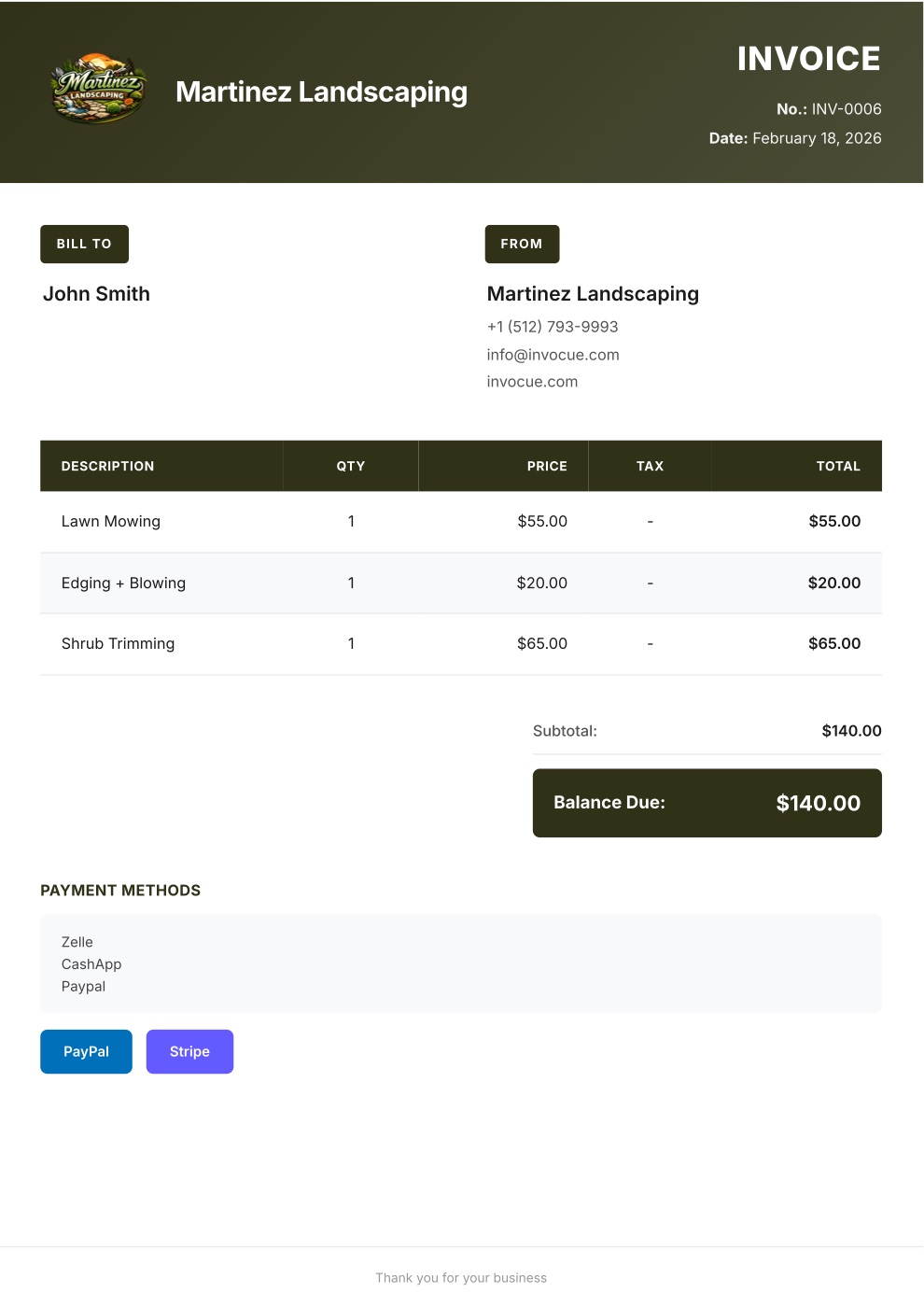
Example invoice PDF created with InvoCue
✓

Payment received

$140.00 · paid by card

The result

What your client receives

A clean, professional PDF with your logo and colors — the kind of invoice that gets paid on time.

  • Your brand on every document

    Logo, colors, contact info and signature.

  • Math done for you

    Items, quantities, tax, discounts and totals — calculated automatically.

  • Pay-by-card buttonPro

    Secure Stripe payment link so clients can pay in a couple of taps.

  • Every document you need

    Invoices, estimates, quotes and receipts — in English or Spanish.

Pricing

Simple pricing. Try it free.

Every plan starts with a 3-day free trial. $0 today, cancel anytime.

Starter

For getting started

$29/mo

$0 today · then $29/mo

  • 50 documents per month
  • Voice notes & text on WhatsApp
  • Invoices, estimates & receipts
  • Your logo & custom template
  • Dashboard & document history
  • Multi-currency
Most popular

Pro

For busy solo pros

$49/mo

$0 today · then $49/mo

Everything in Starter, plus:

  • Unlimited documents
  • Card payments with Stripe
  • Free 1-on-1 setup call

Premium

For teams & growing businesses

$79/mo

$0 today · then $79/mo

Everything in Pro, plus:

  • Automatic email to your clients
  • Open & payment notifications
  • Automatic WhatsApp payment reminders
  • Priority WhatsApp support

Swipe to see all plans

Secure checkout by Stripe · Cancel anytime

Not ready to pick a plan?

Create your first invoice free on WhatsApp — no card needed

14-day money-back guarantee. If InvoCue isn’t for you, message us within 14 days of your first payment and we’ll refund you in full. No questions, no forms.

Frequently asked questions

An estimate (or quote) tells the client what the job will cost before you start. An invoice asks for payment once the work is done. InvoCue creates both.

Yes. Say “quote for…” or “estimate for…” and that’s the title on the document.

Yes. Add “Notes:” at the end of your message — validity, deposit, exclusions — and InvoCue copies it onto the estimate word for word.

Yes. List as many items as you need, by text or voice. InvoCue organizes them and calculates the total.

Your first document is free with no credit card. Plans start at $29/month, each with a 3-day free trial.

Cue, the InvoCue robot assistant

Your next invoice can take 30 seconds.

Send a voice note, get a professional PDF, get paid. Try it now — your first invoice is free.

No signup · No credit card · Cancel anytime